
STP allows invoices submitted from specified suppliers for specified properties to be processed without additional authorisation, as long as the invoices meet the rules you set.
- The criteria (also referred to as threshold) for STP is set according to how much the invoice varies from the last approved invoice for that particular property from that particular supplier, or how much it varies from the work order value issued to that supplier for the property. This can be calculated using a $ or a % variance (see below for using both $ and % thresholds).
-
AIM compares the value of the invoice to that of the work order and then applies the STP settings
- if it passes the STP logic rules it is released “ready for download” to your property management system
- if it fails it moves to the workflow and follows the usual approval processes. That is, if an invoice is outside of the variance levels the usual approval process will be required before it can be exported for processing.
If you are using basic workflow, straight through processing rules can be set for Suppliers from System Data>Suppliers
If you are using basic workflow, straight through processing rules for work orders can be set from System Data>Work orders
If you are using Advanced workflow, STP rules can be set for specific supplier/property combinations from System Data>Advanced workflow.
Setting BOTH $ and % variances
It is possible to apply both a $ value and a % variance – you'd usually use this option when you want to have a % value in place to cover smaller invoices, but a $ value set to make sure large amounts don’t get automatically approved.
For example, a 10% variance on $30 invoice would only be $3, which is a small amount, but 10% variance on $3000 would be $300 and this may be considered too high for automatic approval. To manage that type of scenario set a percentage that permits approvals and also add a $ amount that will identify larger discrepancies. (e.g. setting a 10% variation and $200 would allow the smaller invoice to process as STP, but would send the $300 variance through the standard approval process.)
To set STP
Step 1 - click STP threshold. The STP threshold dropdown box will appear
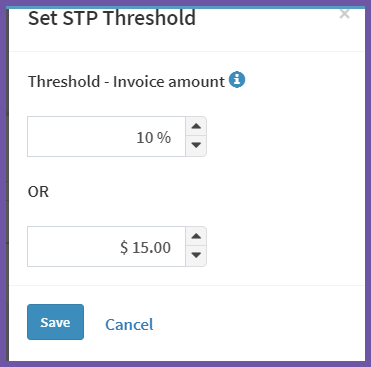
Step 2 - You can choose either $ or % amount or both.
Comments
0 comments
Article is closed for comments.